Posts

Showing posts with the label software

Know the size of Folders using Folder Size For Windows
Image
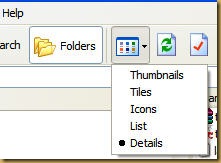
Don't we just love Windows with all it's glorious shortcomings. Some of the features that should have been built into windows were conveniently left out.  But that has proven to be a blessing in disguise. This lack of features has helped developer make utilities to make up for the shortcomings with just the right options to suit your taste. One of the feature I (like many of you) miss is the ability of Windows Explorer to show size of the folders. What stopped MS to include this wonderful little feature is beyond my comprehension. Any ways, I will tell you about this small freeware utility called Folder Size for Windows. Folder Size for Windows can show file as well as folder size (oh, really!!). So lets start downloading it from here. With just 224 KB in size, it is a very helpful little utility. After you have downloaded Folder Size for Windows, install it. To be able to see Folder size you need to open Windows Explorer in Details View as shown below. Now Righ...
IrfanView - The best Graphic Viewer

Image
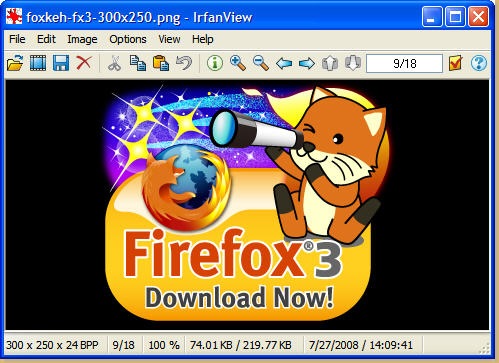
Got a lot of images? Still viewing them in Windows Picture and Fax Viewer? Or are you using Picasa (a photo manager & editor) or Gimp , Photoshop (these are Editors). A good graphics viewer should be light weight, fast and be able to let us flip, zoom, save to other formats and then some more. Enter IrfanView, the Most-in-one graphic viewer.   Apart from being a feature packed, lightweight viewer; it is FREE ( for non commercial use). Let me highlight some of the feature this beauty has for everyone to use. Interface:- A very intuitive and simple interface with almost no learning curve. In fact for most of the daily tasks like Zoom in/out, Next/Previous image, information about image, flip, rotate etc, you will start performing immediately. Supported file formats:- The amount of files supported by IrfanView is huge. In fact  the site has a page dedicated to the supported file formats . Though for some formats to be viewed; you need to have plugins ins...

ToolTips hides behind Taskbar

Image
Tooltip appear when mouse cursor in hovered on to an item without clicking it. It is a very effective solution to provide helpful tips. But Windows has a bug where the tooltip hides behind the taskbar.   This bug had been there since Windows® 95 and has survived till Vista. This makes it the longest surviving bug, and Microsoft® only acknowledged it after the release of Windows® XP SP2. Their way to solve this is to Logout and Re-Login to the account or Reboot (What else !). But now I have found a utility that can be simply be run whenever this problem occurs.   { Download ToolTipFixer } It does not patches or permanently fixes it but at least you don't have to Logout-Login OR reboot your PC. Saves a lot of time for those who really want their tooltips to show correctly. Thanks to BikeMike who used AutoHotKey to create this.   For those who are a little enthusiastic do the following to create your own fixer:- Down...

CCleaner - Remove that junk

Image
You have been browsing Internet and your browser is silently storing pages on your hard disk (called Cache). Your browser is also storing a text file known as cookie which is used by most of the sites to give their user an enhanced user experience. Your browser stores all the information of all the sites you have visited, files you have downloaded. You open documents and Windows creates a list of all the documents you have opened recently. I delete the files that I do not need, but always forget to click "Empty Recycle Bin". Windows saves the commands you give in "Run". Not to forget all the junk files Windows creates on a daily basis. Now that can take up some space on your hard disk. And try cleaning all these files manually. CCleaner is here for your rescue. It is a system optimization and privacy tool. It can delete almost all the junk files your OS so lovingly stores , and frees up that all used up hard disk space. Download, Install and run CCleaner. You wi...

PeerGuardian2 - Premier IP Blocker for Windows

Image
A new movie has been released and you fire up you favorite BitTorrent client to download it. Have you ever thought that some law enforcing agencies can actually get your IP addresses when you connect to their BitTorrent client. Sometimes fake torrents are there on the net just to get the IP address of the downloader, by those fighting piracy. I am the believer that piracy is bad but so is snooping around as to what you are doing without your consent. To save you from this constant fear some very good people at Phoenix Lab have created a very simple tool that can block all the IP Addresses which are known to belong to Government agencies/sites, sites fighting piracy or any such site that your P2P application should not contact. You would be able to download through your BitTorrent Client with a little less worry after the installation of this beautiful piece of software. Download it from here and install it. Start PG2 and go to "Settings" tab. Here you ca...

CryptLoad - Download from Rapidshare

Image
You have dynamic IP Address, that is, whenever you reconnect to Internet, you will have a new IP Address. You have plans to download a lot of files from Rapidshare. But you don't have a Premium Account, which means that you have to wait for some amount of time before your download can begin. Earlier you had to put Captcha code to start download, but now Rapidshare has removed captcha and have replaced it with speed limit. Though the waiting time remains. How you wish you had something that could do the downloading job for you. You could just paste the links and go to bed, knowing that your downloads would be completed. Look no further. CryptLoad has come to the rescue. This software does make downloading of files from RapidShare as if you had a Premium Account . The only restriction is that you won't be having Resume facility or blazing fast speed (as they have capped the speed for Free Users ).  Download and install CryptLoad and go to options. First of all ...

FireFox 3 Released

Image
Date - 17 June 2008 Time - 10.30 PM IST (Indian Stretchable Time) A long wait for my favorite browser and that of millions of others is over. A few days ago I have written about my favorite browser Firefox 2. And I never knew that I will have to again write about a browser which is better than Firefox 2. Yes.... Firefox 3 has been released. I never tested betas or other release candidates as I have always preferred a stable version (Play Safe). So when I downloaded and installed Firefox 3, I was amazed by its speed. This is the first thing you notice when you start browsing. With loads of new features and security enhancements even diehard Internet Explorer fans would want to switch to Firefox 3. Some of the features I really liked at first glance (I have used it for just 10 minutes) is "Single Click Bookmark". When you visit a web site, a star is shown on extreme right hand side of the address bar as shown below.     Click ...

Recover Your Lost Outlook Express Mails

Image
Today one of my friend faced with a situation where his outlook explorer simply would not show him his Inbox. He closed and restarted his outlook express but of no use. Then he came to me for help. Though I am no fan of Outlook or Outlook Express (I use Thunderbird), I decided to have a look. The first task on my hand was to close the Outlook Express, so that damage to the corrupted files are minimized. My second priority was to actually find the path of .DBX files stored on hard disk, take its backup and then start the RESCUE operation.After taking backup of the corrupted DBX files, I actually started to look for some utilities (freeware, Of course) that  can help me in my recovery operations. After some looking around, I found this utility called Power Email Recovery for Outlook Express. Now this seemed to be my knight in shining Armour in the form of 1's & 0's :) After downloading and installing it, I was presented with a fairly simple and very intuitive interfa...

Start of a NEW beginning

This is going to be a new beginning. None of you know me. I am a person who love computers, I mean the challenge that XP operating system presents to us mere mortals. I love to damage my brain to make simple things work using this OS and curse those who made this. And No I am not geek enough to switch to Linux. And why should I let go of this Love-Hate relationship with Microsoft's Operating System ;) . I also like to try lots of software just to see if they are of any help to my rather low productivity levels and help me speed my work. If I would have my way then probably I would want these machines to be controlled simply by Thinking (Yes, I THINK; I think so) I am not a chatting or E-mail freak. I just like browsing and taking all the good things this weird network of madly rushing electrons through hugely priced equipments, know to all of us as Internet, has to offer. From now on I would be sharing whatever little I know about computers and what Internet has to offer. ...