Posts

Showing posts with the label troubleshoot

Tweak your Aspire – Template images gone

Image
Aspire is one of the most appealing blogger templates I have encountered. It was developed by Infocreek which unfortunately is now no more. Though it can still be downloaded at BTemplates . Though the template works, but the image files need to correctly show template in it’s full glory are missing. And the culprit is the original image hosting site where the files related to Aspire template were stored. There are 30 gif/jpg files that make up this beautiful template. All these files were stored on www.webpagedesign.ws/aspire , but now it is not available. So let’s get to work and save our beautiful template. This is how the site looks without those 30 files This is how it should look The basic idea is to host all these 30 image files to a site that does not go down in a hurry and then link these up in our template. What better way to host these images on one of Google’s own site called Google Sites . Now since you have google account (You are using blogger…Right:), ...

Add Recent Comment Widget in Blogger

Image
Ever wanted to put a widget that shows the Recent Comments being written on your blog. My blog is to put what I learn about computers and in the process share my experience with everyone. Now continuing the purpose of this blog, I will share with you the procedure on how to add “Recent Comments” widget. First go to layout => Edit HTML and search for </ head > <script type= 'text/javascript' > function commentDisplay(json) { for ( var i = 0; i &lt; numcomments; i++) { var entry = json.feed.entry[i]; var alturl; if (i == json.feed.entry.length) break ; for ( var k = 0; k &lt; entry.link.length; k++) { if (entry.link[k].rel == 'alternate' ) { alturl = entry.link[k].href; break ; } } alturl = alturl.replace( "#" , "#comment-" ); if (entry.content) { comment = entry.content....

Tweak Your Aspire – Add Comment Form below Post

Image
Continuing my “Tweak Aspire” series is another useful addition. Placement of “Comments Form” at the end of the post so that it becomes easier for everyone to add comments our post instead of being taken to a new page for adding comments or having a popup opening up. Let’s start the process of enabling the Comments Form below Post. But first a word of Caution. Always backup your template…. Just in case First go to Settings => Comments And Select Embed Below post. Now Save and go to Layout => Edit HTML. Here Check Expand Widgets Templates. Here find the code < b:include data ='post' name ='comments' /> And just below this line insert the following code < b:include data ='post' name ='comment-form' /> So that the code looks like < b:include data ='post' name ='comments' /> < b:include data ='post' name ='comment-form' /> Save Your t...

Tweak your Aspire – Show Post Date Correctly

Image
Though I had already written on how to Show post date Correctly HERE it actually involved more code to be added. I am again writing it for the benefit of others and also to have some continuity in posts. Let’s start this small tutorial…. Go to Layout -> Edit HTML Click Expand Widget Templates. Now find the following Code var timestamp = &quot; < data:post.timestamp /> &quot; ; The code around it should look like this <script type= 'text/javascript' > var timestamp = &quot;<data:post.timestamp/>&quot;; if (timestamp != &#39;&#39;) { var timesplit = timestamp.split(&quot;,&quot;); var date_yyyy = timesplit[2]; var timesplit = timesplit[1].split(&quot; &quot;); var date_dd = timesplit[2]; var date_mmm = timesplit[1].substring(0, 3); } </script> <script type= 'text/javascript' >document.write(date_dd);</script> <div class = 'month...

Tweak Your Aspire – Show NavBar and Add Calendar

I have been receiving a lot of mails regarding tweaking of my present theme “ Aspire ”. Many of you are facing problems in deploying this theme and getting desired results. So to help all those who want to help themselves…… Go to Layout => Edit HTML Do not Check “Expand Widget Templates” Now lets start with the Navigation bar at the top. By Default Navigation Bar is Hidden in this theme. Some of you would want to see the NavBar. So to enable it, you have to change the code as follows:- 1: /* === Hide the NavBar === */ 2: .Navbar { 3: visibility : hidden; 4: display : none; 5: } 6: /* === Hide the NavBar === */ Remove */ at the end of line 1 and /* at the Start of line 6 from the code shown above. Now You have your NavBar. Now let’s Add the Calendar for blog archive. Search the code below in your Aspire theme. .up { text-transform : uppercase; } .center { text-align : center; } .l , .l...

EXE file association fix and Open With Dialog box appears on double click

Image
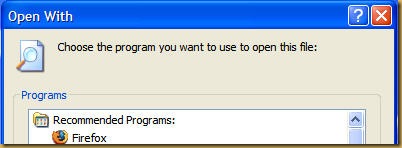
One fine day you boot up your computer and as usual double click on Internet Explorer to get ready to browse the World Wide Web . But wait.... what's this, instead of opening Internet Explorer you are presented with "Open With" dialog box. You think that maybe IE is corrupt. Then you fire your Firefox . Still the same Open With dialog box appears. You try to start your anti-virus...same, your anti-spyware....same. In fact you are not able to launch any of the EXE file. Press Panic Button ..... YES. Because you are infected by a virus. Will you be able to run your EXE's again....Probably YES (if virus/worm has not done too much damage). I faced this problem in my office yesterday. I double clicked on My Computer and the on my C:   drive and I was again presented with Open With dialog box. Now my exe's were not working AND I was unable to browse my C: drive using My Computer route. I first thought of fixing the drive part and found a utility called F...