Posts

Showing posts with the label system

EXE file association fix and Open With Dialog box appears on double click
Image
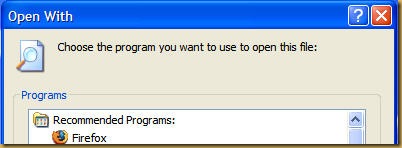
One fine day you boot up your computer and as usual double click on Internet Explorer to get ready to browse the World Wide Web . But wait.... what's this, instead of opening Internet Explorer you are presented with "Open With" dialog box. You think that maybe IE is corrupt. Then you fire your Firefox . Still the same Open With dialog box appears. You try to start your anti-virus...same, your anti-spyware....same. In fact you are not able to launch any of the EXE file. Press Panic Button ..... YES. Because you are infected by a virus. Will you be able to run your EXE's again....Probably YES (if virus/worm has not done too much damage). I faced this problem in my office yesterday. I double clicked on My Computer and the on my C:   drive and I was again presented with Open With dialog box. Now my exe's were not working AND I was unable to browse my C: drive using My Computer route. I first thought of fixing the drive part and found a utility called F...
Know the size of Folders using Folder Size For Windows

Image
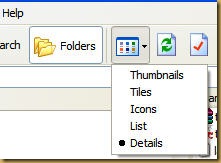
Don't we just love Windows with all it's glorious shortcomings. Some of the features that should have been built into windows were conveniently left out.  But that has proven to be a blessing in disguise. This lack of features has helped developer make utilities to make up for the shortcomings with just the right options to suit your taste. One of the feature I (like many of you) miss is the ability of Windows Explorer to show size of the folders. What stopped MS to include this wonderful little feature is beyond my comprehension. Any ways, I will tell you about this small freeware utility called Folder Size for Windows. Folder Size for Windows can show file as well as folder size (oh, really!!). So lets start downloading it from here. With just 224 KB in size, it is a very helpful little utility. After you have downloaded Folder Size for Windows, install it. To be able to see Folder size you need to open Windows Explorer in Details View as shown below. Now Righ...

ToolTips hides behind Taskbar

Image
Tooltip appear when mouse cursor in hovered on to an item without clicking it. It is a very effective solution to provide helpful tips. But Windows has a bug where the tooltip hides behind the taskbar.   This bug had been there since Windows® 95 and has survived till Vista. This makes it the longest surviving bug, and Microsoft® only acknowledged it after the release of Windows® XP SP2. Their way to solve this is to Logout and Re-Login to the account or Reboot (What else !). But now I have found a utility that can be simply be run whenever this problem occurs.   { Download ToolTipFixer } It does not patches or permanently fixes it but at least you don't have to Logout-Login OR reboot your PC. Saves a lot of time for those who really want their tooltips to show correctly. Thanks to BikeMike who used AutoHotKey to create this.   For those who are a little enthusiastic do the following to create your own fixer:- Down...

CCleaner - Remove that junk

Image
You have been browsing Internet and your browser is silently storing pages on your hard disk (called Cache). Your browser is also storing a text file known as cookie which is used by most of the sites to give their user an enhanced user experience. Your browser stores all the information of all the sites you have visited, files you have downloaded. You open documents and Windows creates a list of all the documents you have opened recently. I delete the files that I do not need, but always forget to click "Empty Recycle Bin". Windows saves the commands you give in "Run". Not to forget all the junk files Windows creates on a daily basis. Now that can take up some space on your hard disk. And try cleaning all these files manually. CCleaner is here for your rescue. It is a system optimization and privacy tool. It can delete almost all the junk files your OS so lovingly stores , and frees up that all used up hard disk space. Download, Install and run CCleaner. You wi...